
Cloud Access Control: The Real Pros and Cons for Chicago Buildings
Cloud access control explained by a Chicago installer: what breaks when the internet dies, what the subscription buys, and when a server room still wins.
· Vidimost LLC
What This Article Is (and Isn’t)
Cloud access control means the management software lives on the vendor’s servers instead of a computer in your building — you run the whole system from a browser, while the door hardware stays local and keeps working even when the internet doesn’t. That’s the short version. The long version is below: the real pros and cons of cloud access control as they play out in Chicago condo buildings and downtown offices we’ve wired ourselves.
We install Brivo cloud systems and Paxton Net2 on-premises systems, so this isn’t a sales pitch for one religion. Both have a place. But most multi-tenant buildings and small offices we work with end up in the cloud, and it’s worth explaining exactly why — and where the trade-offs bite.
First, Let’s Kill the Biggest Misconception
“Cloud” does not mean the hardware disappears. When we say a building runs Brivo cloud access control, there is still a controller board in a cabinet somewhere in that building — a Brivo ACS300 for a handful of doors, or an ACS6100 chassis for a bigger property. There are still lock relays, electric strikes or maglocks, door position contacts, request-to-exit motion detectors, and exit buttons. All the classic door hardware is exactly where it always was.
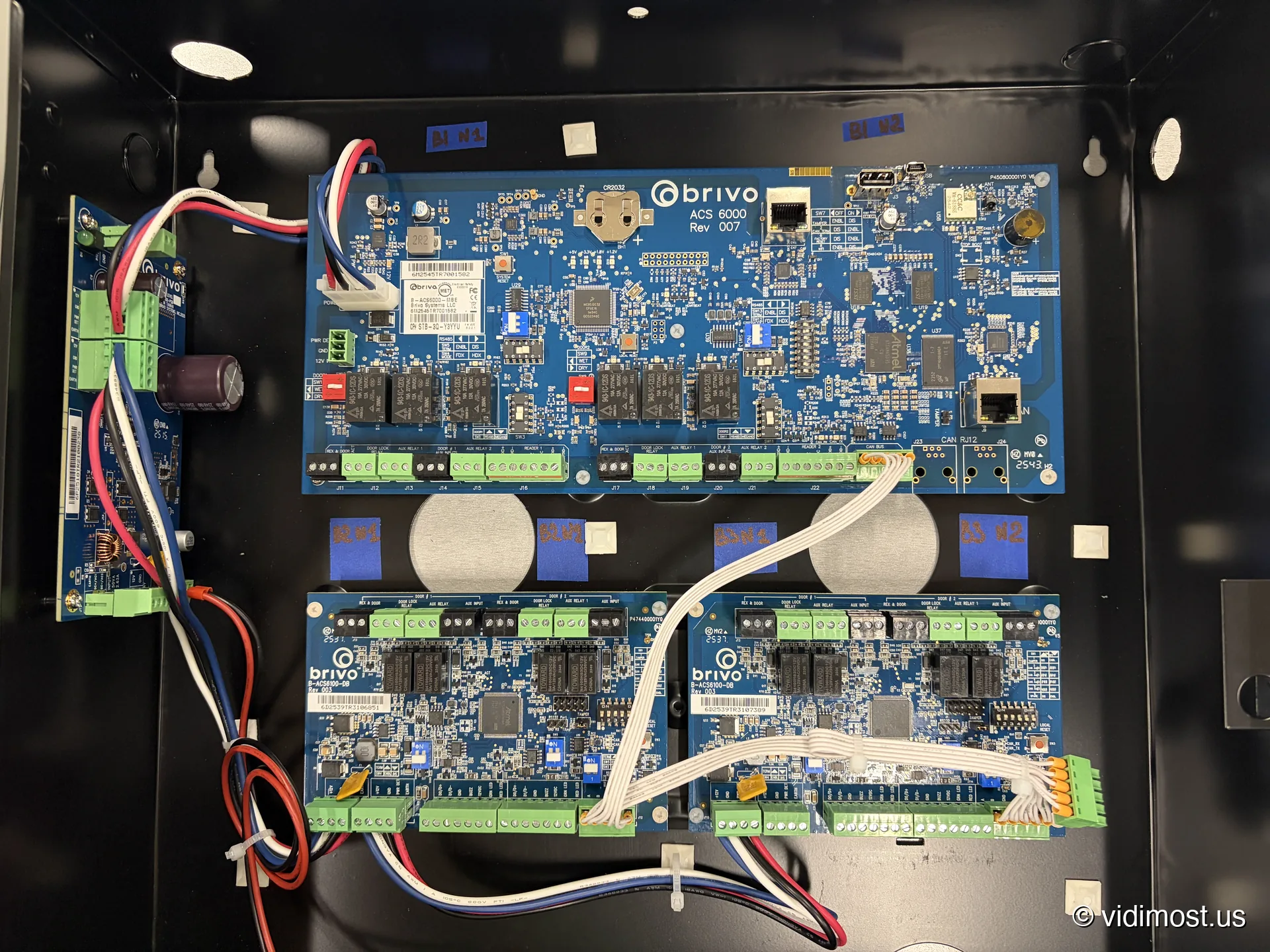 “Cloud” up close: a Brivo ACS 6000 with two ACS6100-DB door boards — six doors of a Chicago building in one cabinet, every terminal labeled before a single wire lands. The cloud didn’t replace this — it replaced the Windows server that used to boss it around.
The difference is what the controller talks to. Instead of reporting to a server PC down the hall, it talks to Brivo’s cloud over your internet connection. The credential database, the access rules, the event log, the firmware updates — all of it lives in the cloud and syncs down to the controller. What got eliminated isn’t the controller. It’s the server.
The Day-to-Day Difference Property Managers Actually Feel
Here’s the practical version, because this is what sells buildings on cloud after years of fighting an old system.
With Brivo, a property manager opens a browser — any browser, on any PC, tablet, or phone with internet — logs into Brivo Access, and everything is right there:
- Event logs. Who entered which door and when, searchable, exportable for an incident report.
- Tenants. A move-in takes a minute: add the person, assign a fob or a mobile credential, done. A move-out is faster: deactivate, and every door in the building stops recognizing that credential instantly.
- The doors themselves. Contractor standing at the front entrance while you’re in a meeting across town? Tap, door’s open, and the log records that you opened it remotely.
Now the same tasks on a traditional on-premises system like Paxton Net2: you need a Windows PC with the Net2 software installed, and that software has to reach the Net2 server running inside the building. If you’re not in the building — or you’re on a Mac, or on your phone in a parking lot — you’re not managing anything. Remote access can be rigged up with VPNs and remote desktop, but that’s IT infrastructure a 24-unit condo association doesn’t have and doesn’t want.
For a single-site office with a manager who sits in the building every day, that limitation may not matter at all. For an HOA whose property manager handles six buildings across the city, it’s the whole ballgame.
The Server Closet Problem Nobody Mentions in Brochures
An on-premises system needs its server to live somewhere, and in Chicago multi-tenant buildings, “somewhere” is a real problem.
The ideal spot is a dry room that doesn’t freeze in January and doesn’t cook in July — in a city that will hand you both extremes in the same week, that’s a real requirement, not a nice-to-have. Not every vintage walk-up or six-flat has that room to spare. If the equipment sits in a common area, it should be in a locked metal enclosure — otherwise your security system’s brain is sitting in a hallway where any tenant, contractor, or curious kid can get at it. In practice we’ve seen “servers” living on a shelf in a damp basement, two feet from the floor drain that backs up every time a storm parks over the North Side. That machine’s uptime is exactly what you’d expect.
Add the quieter costs: a PC that must stay powered 24/7, fans that hum in a room a tenant’s bedroom might share a wall with, Windows updates that need a human, and a hard drive that will eventually die — hopefully after someone remembered to set up backups.
With Brivo cloud access control, the on-site footprint is a controller cabinet that needs exactly two things: power and internet. No OS to patch, no drive to back up, no room to climate-control. Brivo runs the servers, and their uptime is their problem, backed by an actual data center instead of a basement shelf.
To be fair to the other side: that on-prem server, for all its hassle, doesn’t charge you monthly. Paxton Net2’s core software has no subscription — you buy it once. That’s a real advantage and we’ll come back to it in the cons.
”What If the Internet Goes Down?” — The Question Every Board Asks
This is the number-one fear about cloud access control, and it’s built on a misunderstanding of how these systems work.
The controller keeps a full local copy of the credential database. When the building loses internet — Comcast taking a personal day, a dead switch, or a construction crew finding the one cable that mattered, because somewhere in this city there is always a crew digging — the doors keep working exactly as they did the minute before. Fobs that worked still work. Doors that were locked stay locked on schedule. Nothing swings open, and nothing locks anyone in. Egress hardware is mechanical and life-safety wiring doesn’t depend on Wi-Fi — that’s code, and it’s how we build every door.
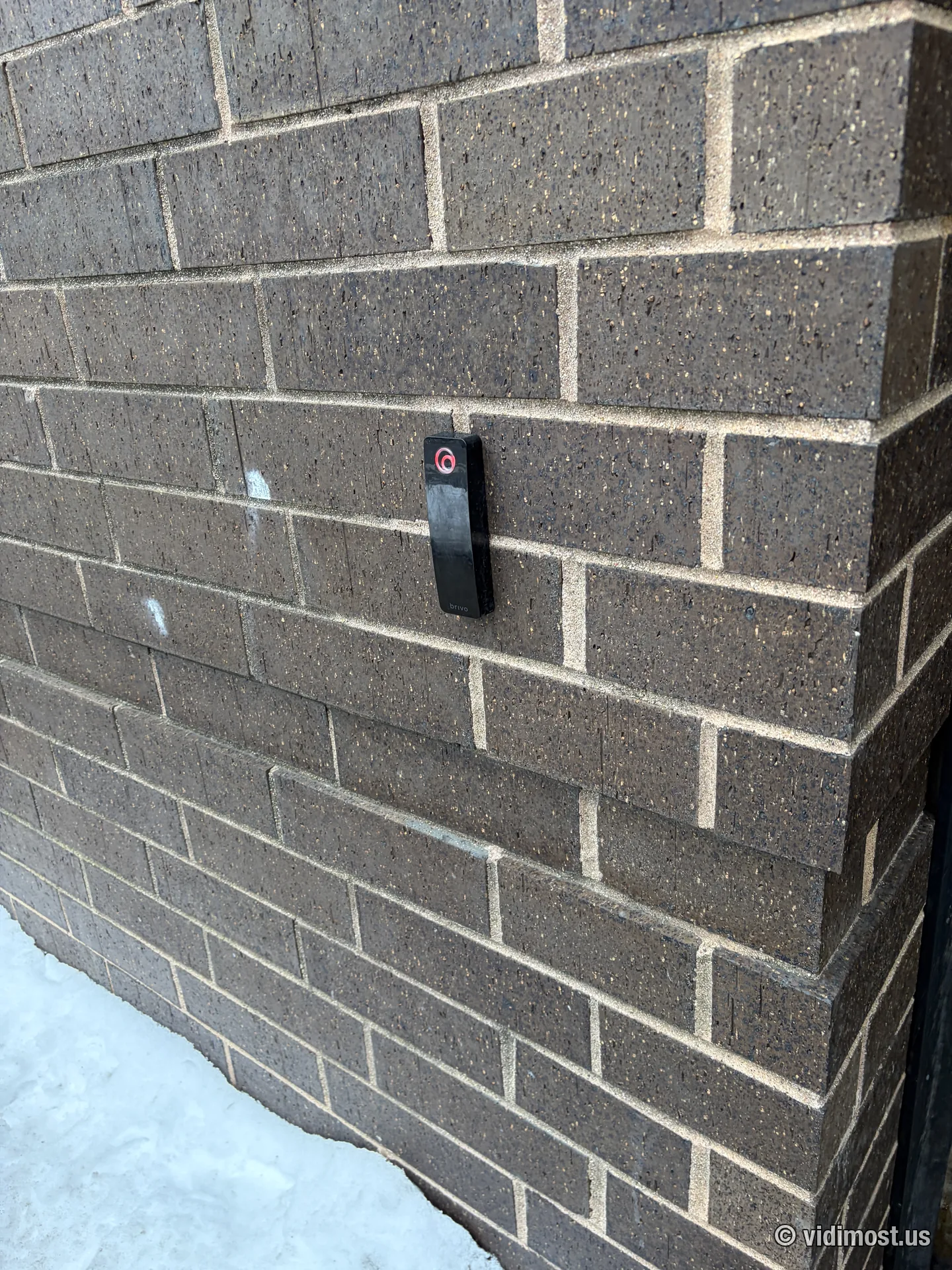 This reader on a Chicago entry doesn’t care whether the building’s internet is up — the controller behind it makes its own decisions until the cloud comes back.
What you lose during an outage is the management layer: if you add a fob or change someone’s access while the building is offline, the controller picks up those changes only when the connection returns. Events that happen offline are stored locally and sync up afterward, so the audit trail doesn’t get holes in it. In several years of running Brivo buildings across Chicago, we have yet to see an internet outage cause a single locked-out resident — the outages residents actually notice are the power kind, which is why we put controllers on battery backup.
Why HOAs and Condo Boards Are the Perfect Fit
Multi-tenant buildings are where cloud access control stops being a convenience and becomes the only sane option. The pattern is always the same: the property manager is not in the building most of the time, but is responsible for it all of the time.
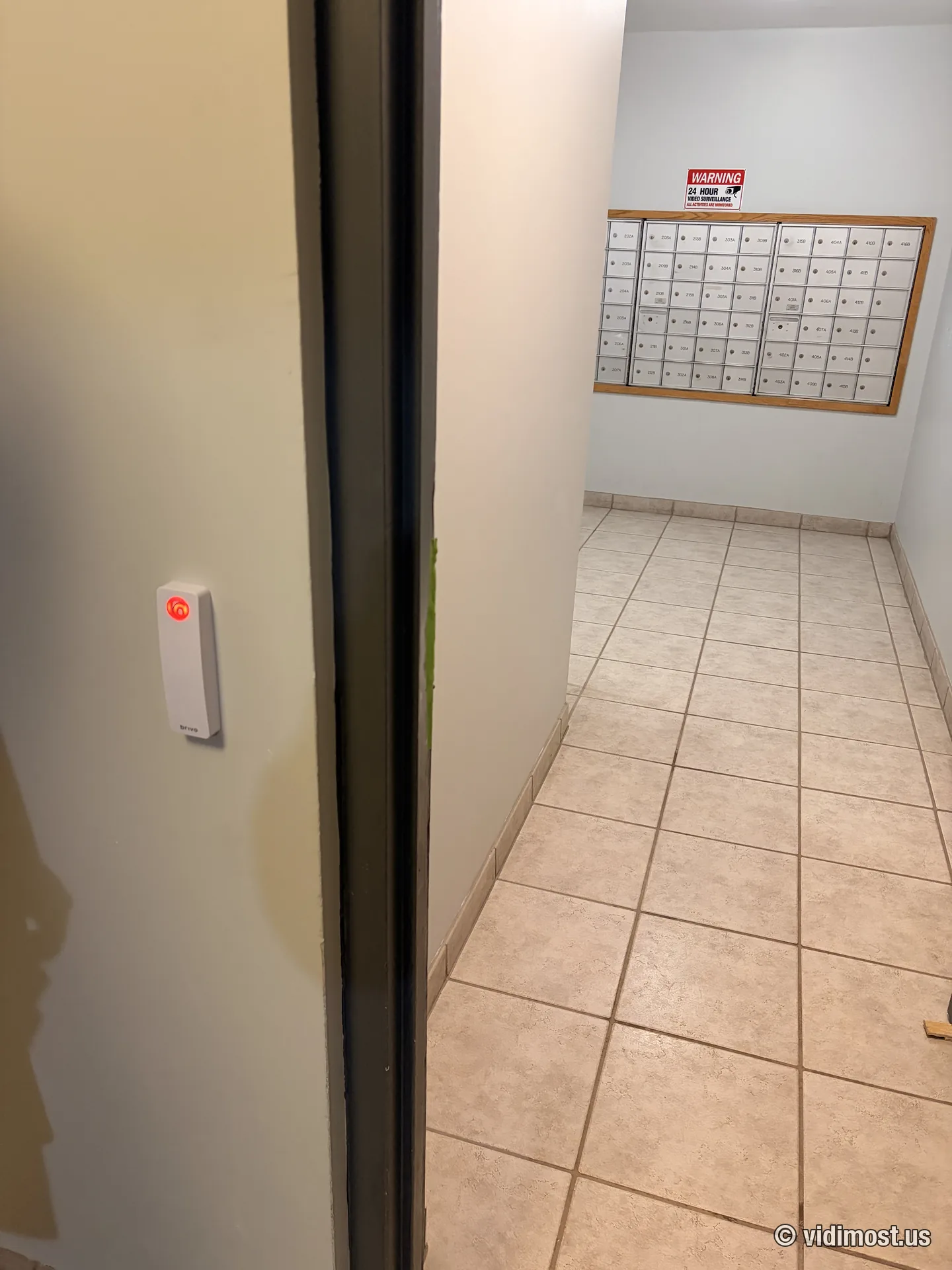 A Brivo mullion reader controlling a mailroom door in a Chicago apartment building — a door that used to run on one shared key. And “one key” in a Chicago building means eleven copies, the same way one shoveled parking spot means a lawn chair.
A few things we set up on every Brivo building that boards end up loving:
- Door position monitoring. With a door contact installed and configured, the system knows in real time whether each door is physically open or closed — not just whether the lock was released. The manager can check from a phone whether the garage entry actually shut behind the last car.
- Forced-door alerts. If a door opens without a fob read or exit request, that’s a forced-open event, timestamped and pushed as an alert. This is how you find out about the propped-open service entrance today, not from a break-in report next month.
- Held-open alerts. Door wedged open with a doormat on a first-of-the-month moving weekend and forgotten? The system notices after a set number of minutes and says so.
One honest caveat from the field: these features only exist if the installation includes them. A door contact costs a few dollars and ten minutes during install — and is a headache to add after the fact. At a professional install, all of this should be wired and activated on day one. When we take over Brivo systems installed by others, half the time the door contacts were never connected, and the board never knew those features existed. That’s not a Brivo problem; that’s an installer problem.
For credentials, our standard setup runs encrypted Brivo BUC3 fobs and phones side by side on the same readers. Residents who want the app use Brivo Mobile Pass, residents who want a fob get a fob, and the guy on three who still flips his phone open is covered too.
Small Downtown Offices: The Other Sweet Spot
The second group that gets outsized value from cloud is small offices in the Loop, River North, and West Loop — the 10-to-40-person companies in glass-front suites with no IT department.
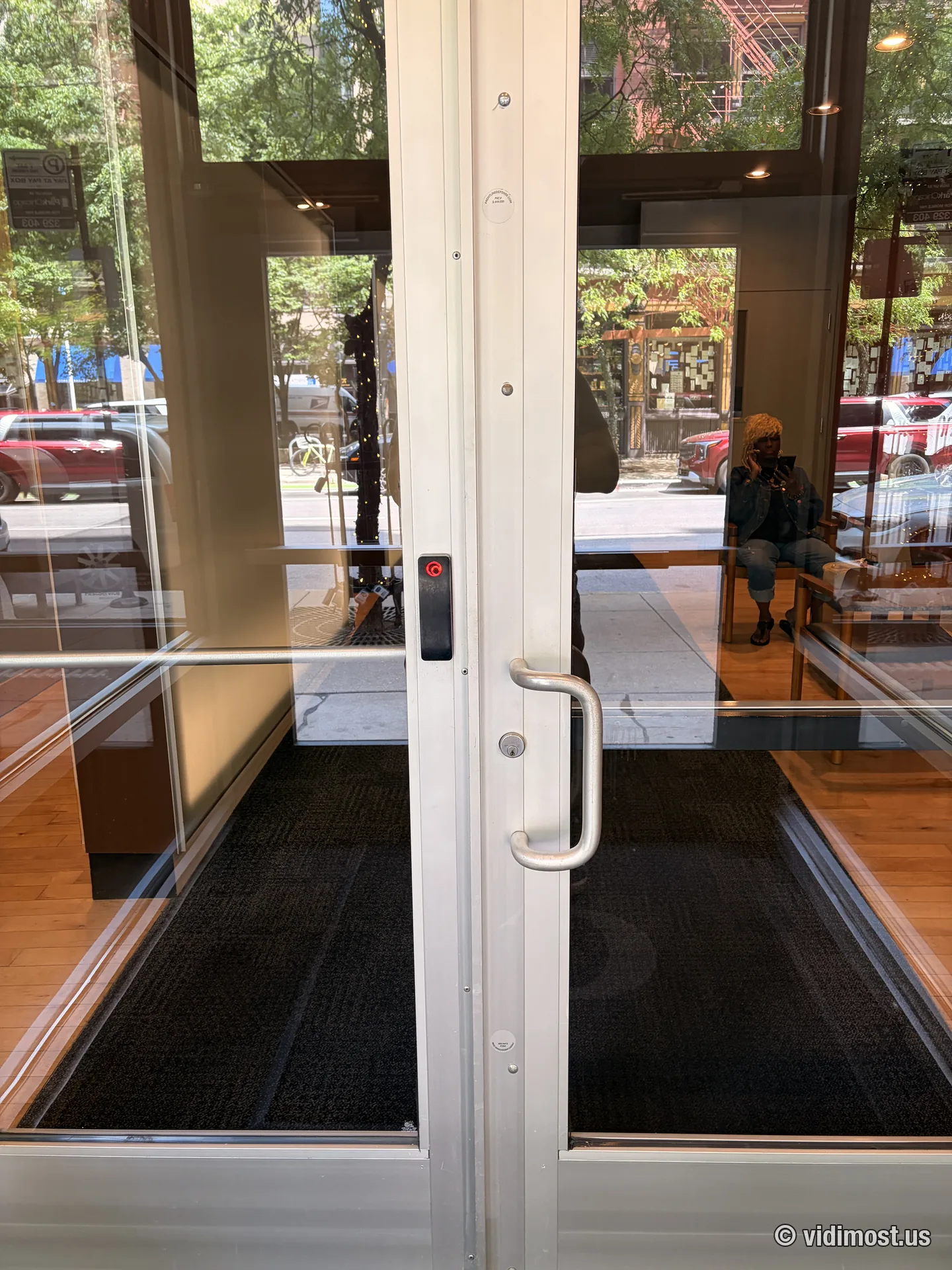 A slim Brivo reader on a glass storefront door in downtown Chicago — on aluminum-framed doors like this, the mullion form factor is the only thing that fits cleanly.
The story here is simple: nobody in the company wants to own a server. The office manager becomes the access administrator with zero training beyond “here’s the website.” An employee leaves on Friday afternoon — their credential dies from a phone in the parking garage, not on Monday when someone remembers. On storefront doors like the one above, we typically hang a Brivo mullion Smart Reader on the frame; on wider walls, the standard Smart Reader reads fobs, cards, and phones on the same unit.
The Honest Cons
Every vendor page lists the pros. The cons go down like Malört — nobody orders them, but around here we serve them anyway.
1. The subscription is real and it’s forever. Brivo charges a recurring fee per account. It’s not painful for a building that’s comparing it against the cost of one service call a year to resuscitate a dying server PC — but it never goes away. It’s as permanent as construction on the Kennedy. Paxton Net2 costs more attention and less money: buy the controller, own it, pay nothing monthly.
2. You’re marrying a vendor. Your configuration, your event history, your credential database — they live in Brivo’s cloud. Brivo has been at this since 1999 and is about the safest bet in the category, but the dependency is structural: stop paying and the management layer goes dark. With on-prem, a lapsed relationship with your installer changes nothing about what the software does tomorrow.
3. Internet quality becomes part of your security posture. The doors work offline, but management, alerts, and remote unlock don’t. A building with flaky internet will feel that flakiness in the moments it most wants the cloud — usually while a contractor is standing at a locked door. (Fixable: we put access control on its own VLAN and, for some buildings, add a cellular backup path.)
4. Data residency. Some organizations — law firms, clinics — have policies that say access logs don’t leave the building. That’s not paranoia, it’s compliance, and it’s a legitimate reason to run on-premises instead.
If none of those four made you flinch, you’re a cloud building. In our experience that’s most condo associations, most property managers, and nearly every small office — the exceptions are single-site operations with a hard no-subscription stance or a data-residency rule.
The Bottom Line
| Cloud (Brivo) | On-premises (Paxton Net2) | |
|---|---|---|
| Manage from | Any browser, anywhere | Windows PC + local server, in building |
| On-site equipment | Controller cabinet: power + internet | Controller(s) + server PC in a proper room |
| Internet outage | Doors work; changes sync later | Doors work; nothing depended on internet |
| Recurring cost | Monthly subscription | None after purchase |
| Off-site manager / multi-building | Built for it | Painful |
| Best fit | Condos, HOAs, small offices, portfolios | Single-site, IT on staff, no-subscription policy |
If you’re weighing this decision for a Chicago building, the deeper platform comparison is in our Brivo vs Paxton article, the money question is covered in what access control costs in Chicago, and the HOA-specific angle is in best access control for HOA buildings.
Or skip the reading: tell us how many doors and what kind of building, and we’ll tell you straight which side of this table you’re on. Site surveys across Chicago are free — details on our access control service page.
Written by the install crew at Vidimost LLC — Chicago security installers with 18 years in the trade, from analog CCTV to cloud access control. Licensed and insured, working condo buildings, small businesses, and restaurants across the city.