
Paxton Net2 Plus 1-Door Controller (682-721) — On-Premises Net2
Model / Series: Net2 Plus
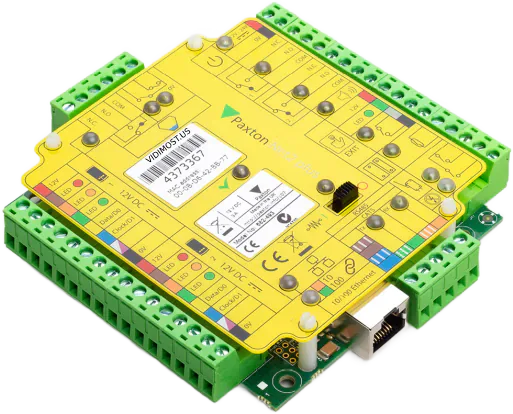
On-premises Paxton Net2 door controller — one door per metal cabinet, PoE+ powered, with the access database on your own server, not a cloud.
$820 MSRP · equipment only
Sold by order — most of these go in as part of an install, but we'll sell the hardware outright too. Availability, lead times, and project pricing: ask our manager when you request a quote.
We don't just ship boxes — this goes in as part of our access control installation in Chicago work. First time working with us? Here’s why Chicago buildings pick Vidimost.
Specifications
- SKU / Part Number
- 682-721
- Brand
- Paxton
- Series
- Paxton Net2 Plus
- Supplied As
- 682-721 — PoE+ version in metal cabinet (the variant priced here); 12 V 2 A PSU cabinet versions also available
- Form Factor
- Door controller in metal cabinet with battery-backup space
- Doors Supported
- 1 per controller (runs in/out readers on the same door)
- Reader Ports
- OSDP / Wiegand or Paxton-proprietary RS-485
- Network
- Ethernet (10/100) to Net2 server
- Power
- PoE+ on the 682-721 (one cable for data and power); PSU cabinet variants take mains with 12 V DC out; battery-backup space for sealed lead-acid
- Inputs
- Per door: door contact, REX, tamper, auxiliary
- Outputs
- Per door: lock-control relay, auxiliary
- Video Verification
- Yes — links door events to Paxton-integrated camera footage
- Integration
- Paxton Net2 software, Paxton Entry video intercom, Paxton-integrated VMS systems
- Server Platform
- Net2 server (Windows PC or appliance) on customer LAN
- Mounting
- Wall-mount metal enclosure with security fixings
Best Fit & Recommended For
Paxton Net2 Plus Door Controller
The Paxton Net2 Plus controller is the on-premises door controller for Paxton’s Net2 access control platform. Each controller runs one door — with support for in/out readers on that door — and connects to the Net2 server over standard Ethernet on the customer LAN. The variant we stock and price here is the 682-721: metal cabinet, space for a sealed lead-acid backup battery, and PoE+ power, which on a retrofit is a genuinely big deal — one network cable brings both data and power, so there’s no electrician line item just to hang a controller. Cabinet versions with a built-in 12 V 2 A mains PSU exist for doors where PoE isn’t practical.
When On-Premises Beats Cloud
The Paxton10 010-403 is the cloud-managed alternative — and for most Chicago commercial properties, cloud admin is the better fit. Net2 Plus remains the right pick for three specific situations:
- Data-residency rules — some owners (and their insurers or compliance auditors) require the access database to sit on hardware they control
- Air-gapped networks — properties without internet uplink for the access control system, or where security policy prohibits cloud connectivity
- Existing Net2 portfolios — properties already running Net2 servers can keep adding controllers to the same platform without introducing a second admin platform
For new commercial deployments without a regulatory or air-gap requirement, Paxton10 is usually the better choice — no Windows server PC to maintain, automatic firmware updates, browser-based admin.
Net2 Plus Adds Over Standard Net2
The “Plus” tier of Paxton Net2 controllers adds over the base Net2 platform:
- Video verification — door events automatically link to camera footage from integrated Paxton Entry intercoms, Paxton-supported VMS systems, and other CCTV integrations
- Enhanced event reporting — richer audit trails, exportable reports, and tighter integration with the Net2 Pro / Net2 Plus admin software
- OSDP support — encrypted bidirectional reader communication (Net2 Plus controllers can run OSDP where the standard Net2 generation was Wiegand-only)
- Higher integration ceiling — open API access for VMS, intercom, and PSIM integrations
Cross-Paxton Comparison
| Feature | Net2 Plus (this) | Paxton10 010-403 | Net2 IO Board (489-710) |
|---|---|---|---|
| Platform | On-premises (Net2) | Cloud (Paxton10) | On-premises Net2 expansion |
| Doors per unit | 1 (in/out readers) | 1 | N/A (4 inputs / 4 outputs) |
| Form factor | Metal cabinet, PoE+ or PSU, battery space | PCB (customer enclosure) | PCB expansion board |
| Admin platform | Net2 software (Windows PC) | Browser + mobile (cloud) | (works with Net2 parent controller) |
| Best fit | On-prem / no-cloud sites | Cloud-first deployments | Adds I/O capacity to Net2 panels |
Where the Paxton Net2 Plus Controller Wins in Chicago
- Chicago commercial buildings requiring on-premises access control
- Multi-floor commercial buildings already on Net2
- Multi-tenant residential and HOA buildings on Net2 portfolios
- Property management portfolios with shared Net2 server across multiple buildings
- Education facility administrative networks
- Hospitality back-of-house and operations on Net2
- Industrial / warehouse Net2 deployments
Local Chicago Coverage
Vidimost installs the Paxton Net2 Plus controller across the full city of Chicago for on-premises access control deployments.
Recommended Pairings
- Paxton10 Door Controller (010-403) — sibling cloud-managed platform for new buildings
- Paxton Net2 IO Board (489-710) — adds 4 inputs / 4 outputs to a Net2 Plus controller for fire interlocks, elevator outputs, and auxiliary monitoring
- Paxton KP50 Keypad Reader — Net2 indoor 2-factor reader
- Paxton KP75 MIFARE Metal Keypad — Net2 outdoor vandal-metal 2-factor reader
- Paxton P50 Reader — Net2 single-format proximity reader
Professional Installation by Vidimost
Vidimost LLC is an active Paxton installer across Chicago. The Paxton Net2 Plus controller is our standard on-premises Paxton controller for Chicago projects requiring local data residency. Full-scope service includes site walkthrough, Net2 server setup, controller-and-reader sizing per building, OSDP wiring, lock and door-hardware integration, controller commissioning in the Net2 software, and operator + admin training. Contact us for a free site walkthrough and quote.
Frequently Installed Together
Paxton
Paxton10 010-403 Door Controller
The Paxton10 Door Controller (010-403) is the single-door PCB controller for the Paxton10 cloud-managed access control system — supplied as a board that mounts inside a customer-supplied enclosure or pre-wired backbox. Encrypted RS-485 to Paxton10 readers; supports 1 door per controller, multiple controllers federated under one Paxton10 cloud account.
View →Paxton
Paxton Net2 I/O Board (489-710)
4-input / 4-output expansion board for Paxton Net2 — fire-alarm interlocks, elevator floor enables, and auxiliary relays off a Net2 Plus controller.
View →Paxton
Paxton KP50
Paxton's card-plus-PIN unit for Net2 — a 125 kHz fob reader and 12-button keypad in one IP67 housing.
View →Paxton
Paxton KP75 MIFARE
Metal keypad reader for Paxton Net2 — MIFARE card plus PIN at doors that take abuse: parking garages, gated entries, Chicago alley doors.
View →Paxton
Paxton P50
The Paxton P50 (353-110) is the standard 125 kHz proximity reader in Paxton's Net2 / Switch2 line — 2" wide mullion / wall-mount form factor for typical commercial doors. Reads Paxton tokens + EM 125 kHz credentials, IP67 waterproof, 3" token read range, 4 ft hands-free range. The most-installed Paxton Net2 reader for standard wall-flush installations at Chicago offices, condos, HOA buildings, and commercial properties.
View →