Built right. Accessible from anywhere. Documented in detail. Supported on weekends and holidays.
Look — from where I sit, a security system isn't done when the cameras are up on the wall. It's done when the property manager can pull every camera up on her phone on the L coming back from another building, when she can hand the board a binder that actually means something, when she can call us at 7 PM on a Sunday and somebody picks up. That's the bar. I been doing this around Chicago long enough to put systems in everything from 70-story high-rises in the Loop, to lakefront mid-rises, to courtyard condos tucked back off Halsted, to courtyard walk-ups off the boulevards — and every one of them has its quirks.
Property managers don't just need cameras and card readers — they need systems they can manage remotely, vendors who answer the phone, documentation they can hand to the next person, and consistent quality across every building in their portfolio.
1
Built right, works for years
PMs don't have time to nurse a flaky system through every Chicago storm and ComEd power blip — and lake-effect winters will find every shortcut a half-baked install took. We architect every job — camera placement, riser-closet wiring, PoE budget, UPS sizing, network segmentation — so it runs unattended. The way it should.
2
Manage from anywhere — office or phone
Cameras and key fob admin from your office desktop, your phone in another building, or your laptop at home. Cloud platforms with mobile apps. Most PMs around here juggle 3+ buildings — you can't be on-site at all of them at once, especially when one's in Streeterville and the other's in Glencoe and there's traffic backed up on the 90.
3
Multi-building portfolio workflow
Same equipment across your portfolio — same cameras, same access controllers, same intercom platform. Your team learns one system, not five. New building added to the portfolio — it plugs into the same workflow without anybody having to crack open another manual.
4
Documentation + board walkthroughs
Detailed deliverables for HOA boards: network diagrams, equipment inventories, credential lists, maintenance schedules. We come to board meetings, present findings, walk new members through the system on-site when boards rotate. Boards rotate, property managers change companies — the documentation stays.
Buildings we know
From 70-story downtown high-rises to lakefront courtyard condos to city townhouses communities — every building type around here has its own quirks, and I been doing this long enough to know all of them.
Downtown Chicago high-rises (up to 70 stories)
Riser-closet equipment per floor (yes, every floor), dedicated lobby + amenity floor coverage, garage gate logic with multiple zones, freight elevator readers, doorman station integration, and high-bandwidth networking through the tower's BDF/IDF closets. We've put systems in buildings where the freight elevator goes 70 floors but the resident elevator only goes to 42 — and the access control has to know the difference.
Mid-rise condos (10–30 floors)
Lakeview, Edgewater, the Loop. Standard residential floor coverage, package room + bike room cameras, garage perimeter, common-area amenities (pool deck, gym, party room). Mostly buildings from 2010 onward.
Vintage courtyard + walk-up condos
Lincoln Park, Lakeview, Old Town. 1920s buildings where the equipment ends up in attics, basements, and shared mechanical rooms nobody's touched since the first Bush administration. We know how these are wired and where the quirks live. There's always a quirk.
Low-rise + townhouse communities
Winnetka, Wilmette, Northbrook, Glencoe. Garage gate access (usually with ControlID windshield tags so residents aren't fumbling for fobs at 10 below in February), perimeter cameras, common-area pool and clubhouse coverage.
Mixed-use + podium-style developments
Ground-floor retail with upper-floor residential — shared lobbies, separate garage entries for retail vs residential, and tenant-vs-resident access logic that needs careful credential design. Common around West Loop, Logan Square, and the Fulton Market area.
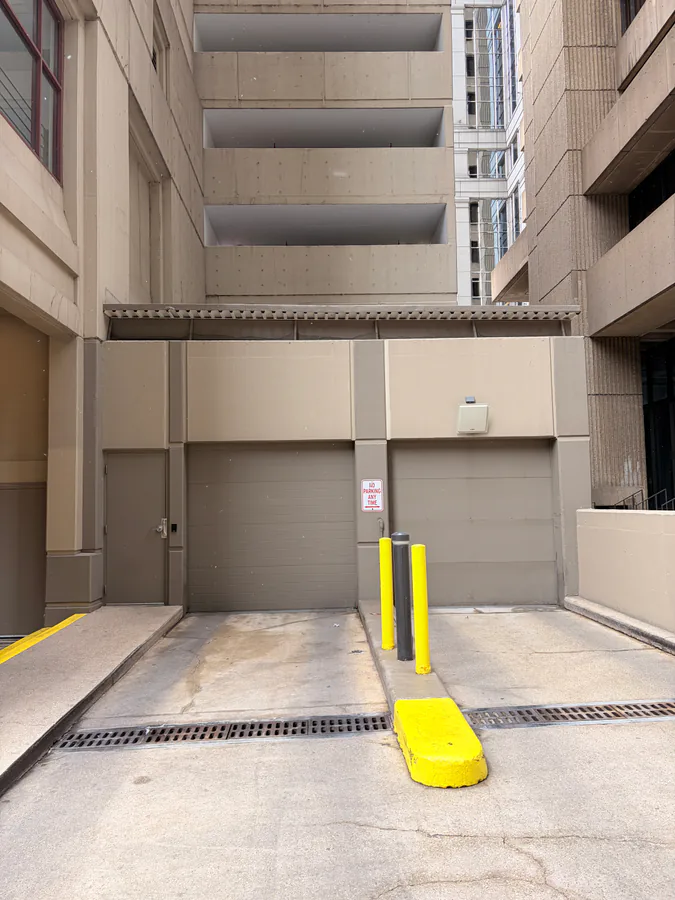
Garage gate setup in a 50-story Chicago residential high-rise — multi-zone resident parking with ControlID windshield-tag reads.
Photo: Vitaliy Verheles · Vidimost LLC
Lobby intercoms — chosen for reliability
The intercom is the face of the building. Tenants use it every time they got a guest, every delivery, every Uber pickup at 11 PM. If it doesn't work, they notice. Loud.
Around here, three intercom platforms win for different building types:
Runs on the building network, integrates with Brivo for unified credentials, weather-rated for Chicago exposure. SIP-based so it works with every modern phone system. Our default for new construction in the Loop and West Loop.
Extremely reliable, doesn't depend on Wi-Fi, but heavier install — wiring runs from every unit back to the central station. The right choice when you want a system that works whether the internet does or not.
Virtual keys, photo verification on the screen, easy delivery integration. The right call for buildings where residents want a modern app experience and you don't want to pull new wire through a vintage building.
We don't have one favorite. We pick whichever fits how the building actually runs. New construction with structured cabling? 2N or Aiphone. Vintage condo conversion where pulling new wire is gonna be a nightmare? ButterflyMX every time.
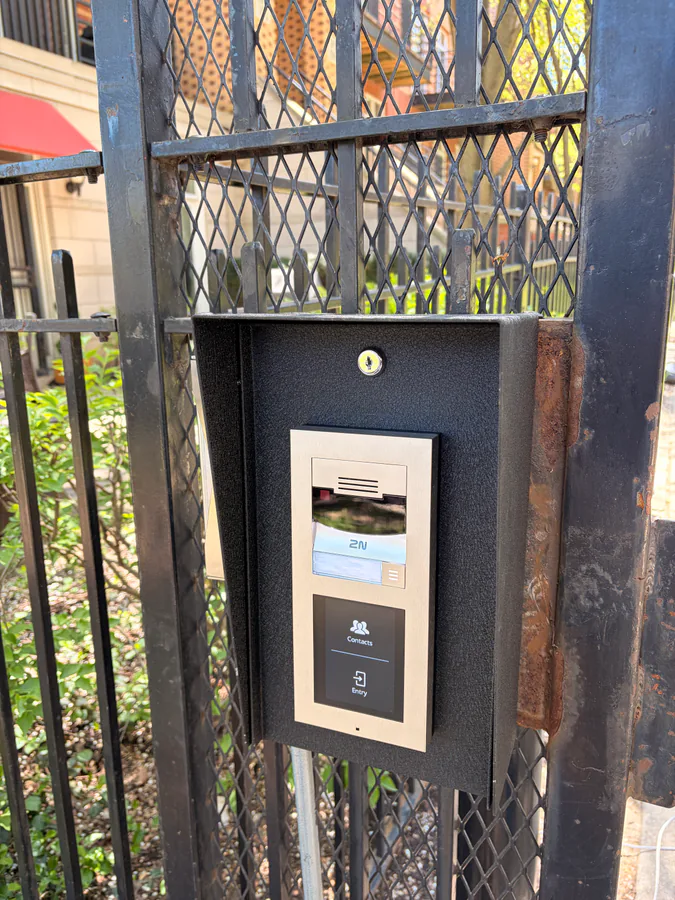
Lobby intercom installation in a Chicago multi-tenant building.
Photo: Vitaliy Verheles · Vidimost LLC
Where we focus — common areas + amenities
Most security incidents in residential buildings happen at predictable points — the parts where strangers and residents mix. The lobby. The package room. The garage gate. The alley. We design around them, not around the lobby being pretty for a marketing photo.
Lobbies + reception
Camera coverage of every entry, intercom panel, front desk view. Visitor management workflow with optional pre-registration.
Package rooms (USPS + Amazon)
Cameras + access logs + chain-of-custody. When a tenant says "my package is missing" you have video and entry records.
Garages + parking
ControlID windshield-tag readers for instant gate entry. License-plate-recognition cameras for vehicle records. Per-spot or per-tenant parking enforcement when needed.
Alleys + building perimeter
Often the weakest spot in Chicago condos — back-of-building cameras with proper night IR, strategic placement that survives Chicago winters.
Pool, gym, common rooms
Time-restricted access (gym hours, pool season), camera coverage for liability, automatic credential expiration.
Front + side entrances
Reader placement that works in winter (gloved hands), mobile-credential-friendly readers, and intercom panels weather-rated for Chicago exposure.
Front desk operations + employee oversight
Front desk staff need to do their job — issue visitor passes, watch the lobby, operate the package room — without seeing things they shouldn't see. That balance gets built into the credential design from day one. And property managers running buildings remotely need a way to know what's happening at their front desks without driving over there every time.
Front desk operator station — restricted-credential view. Photo: Vitaliy Verheles · Vidimost LLC
Tiered credentials
Front desk gets lobby cameras + package room + visitor pass issuance — but not floor-level cameras, not maintenance areas, not resident database access. Strict separation by role.
Activity logging
Every action a staff member takes is logged with their identity. Searchable by name, date, action type. Property management gets a weekly digest if you want one.
Schedule-based access
Credentials only work during the staff member's shift hours. Easy off-boarding when somebody quits or moves on — no chasing fobs around.
Camera coverage of the front desk
For liability, not surveillance — if a tenant claims something happened at the front desk, you have video. Saves arguments before they start.
For PMs running multiple buildings, this gives you visibility into what's happening at every front desk without having to drive over there. Pull up any building's front-desk view from your office desktop in 10 seconds.
Modern access control we set up
Phones replacing fobs. Windshield tags replacing garage clickers. Tiered staff credentials with audit trails. Time-restricted USPS keys. Amazon delivery integration. The technology that makes property management actually manageable.
Phone-as-Key (Brivo)
Residents enroll their phone in the building app and unlock with a tap. No fob to lose, no fob to deactivate when they move out — credential lives on their phone, you remove it remotely. Works at lobby, common areas, package rooms, gym.
Residents stick a small UHF tag inside their car windshield. As they approach the gate, it reads automatically and opens. No fumbling for fobs in February snow. Combined with LPR cameras, every vehicle entry/exit is logged.
Restricted credentials for front desk
Front desk staff can issue visitor passes, monitor lobby cameras, operate the package room door — but can't see floor-level cameras, can't add/remove residents, can't access maintenance areas. Tiered credentials with full audit trail.
USPS time-restricted access keys
Carrier's fob only works during delivery hours, on specific entry doors only. Outside delivery hours the credential is inactive. Eliminates the "USPS key under the rock" problem.
Amazon Key integration
For supported buildings, Amazon Key for In-Garage Delivery integrates with the access control system — drivers get one-time codes for the specific delivery window, and every entry is logged with photo verification.
Visitor management
Pre-registered visitors get a one-time code or link valid only during their visit window. Front desk gets a heads-up. Residents see who's been buzzed up and when.
Always-on support — including weekends and holidays
Property management doesn't pause for weekends, and neither do we. Look — around here there are three things you don't mess with: ketchup on a Chicago dog, deep dish vs Pequod's, and a building that needs its cameras working at 6 PM on a Saturday. We pick up the phone. Most issues we diagnose remotely the same day — if a tech needs to come on-site we schedule it, we don't disappear into a "next business day" black hole.
Same-day diagnosis
For most issues — remote-first
Weekend coverage
Saturday + Sunday on-call
Holiday availability
For emergencies
Documentation + board walkthroughs
HOA boards rotate. Property managers change companies. Maintenance staff turns over. The system stays. Every building we manage gets a complete documentation package built so the next person who walks in can pick up where the last one left off — without re-discovering the system from scratch.
And when boards rotate or new managers join the portfolio, we come on-site for a walkthrough. We present at board meetings on request, walk new members through the system, and explain the deliverables. The system isn't a black box and we don't keep it that way.
Network topology diagram for every building
Camera placement map with viewing angles
Equipment inventory: model, firmware, location, age
Credential list with assigned roles + permission tiers
Maintenance schedule with firmware update cadence
Wiring map and termination labels
Vendor contact list for each manufacturer
Board presentation slides (when requested)
Adding a building you didn't choose the system for?
When you onboard a new building, it usually comes with a security system installed by someone else — often without documentation, sometimes without admin passwords, occasionally with a vendor who's stopped answering the phone. Our system takeover process starts with a free site walkthrough — we document what's there, what works, what doesn't, and what the upgrade path looks like. You get a clear picture and a rational plan, not a sales pitch to replace everything. ~90% of inherited systems are recoverable without full replacement.
How do I manage multiple buildings from one place?
Cloud-managed platforms (Brivo for access, Hanwha WAVE or Axis Camera Station for cameras, UniFi for networking) let your team manage every building in your portfolio from a single dashboard. We standardize on the same equipment and platforms across the buildings we manage for you, so your staff learns one system instead of five — and switching between buildings is just switching tabs.
Can I check cameras and grant access from outside the building?
Yes. Every system we deploy works the same way from a coffee shop, your home, or another property as it does from the building's front desk. Camera feeds, access logs, key fob assignment, lock/unlock commands, visitor pre-registration — all from anywhere, on desktop or mobile app. This is essential for property managers running 3+ buildings — you can't be on-site at all of them at once.
Do you support 70-story Chicago high-rises?
Yes. We've built and supported security systems for downtown Chicago high-rises (riser-closet equipment per floor, dedicated lobby + amenity floor coverage, garage gate logic, freight elevator readers), lakefront mid-rises, courtyard condos in Lincoln Park / Lakeview, and low-rise walk-ups across the North Side. Each building type has its specifics — we know them.
Can residents use their phone instead of a fob?
Yes — with Brivo Mobile Pass, residents enroll their phone in the building's mobile app and unlock common areas with a tap or wave. No physical fob to lose, no fob to deactivate when a resident moves out (just remove their mobile credential remotely). Your phone is your key.
How do you handle USPS, Amazon, and other delivery access?
For USPS, we issue dedicated time-restricted credentials (the carrier's fob only works during delivery hours, on specific entry doors). For Amazon, we integrate with Amazon Key for In-Garage Delivery in supported buildings, or set up a managed package room with cameras, access logs, and chain-of-custody — so when a tenant says "my package is missing" you have video plus access records of who entered the room and when.
What about garage access for residents?
We deploy ControlID windshield-tag readers — residents stick a small tag inside their car windshield and the gate opens automatically as they approach. No fumbling for fobs while it's snowing in February. Combined with license-plate-recognition cameras at the gate, you also get a record of every vehicle entering/exiting.
What if something breaks at 7 PM on a Saturday?
We answer. Most issues we diagnose remotely the same day. If a tech needs to come on-site, we schedule for Monday unless it's an emergency (lockout, full-system failure) — in which case we come out. No "next business day" black holes, no answering service forwarding you to voicemail. Property management doesn't pause for weekends and neither do we.
Do you provide documentation we can hand to the board?
Yes. Every building gets a full package: network diagram, camera placement map, equipment inventory with model numbers and firmware versions, credential list with assigned roles, maintenance schedule, and vendor contact list. We can present it at a board meeting and walk every member through the system on-site if they want — board rotations are a normal part of HOA work, and the documentation ensures continuity across them.
Can you set up restricted access for front desk staff?
Yes. Front desk staff get a tiered credential — they can issue temporary visitor passes, watch the lobby cameras, and operate the package-room door, but they can't see other floors' cameras, can't add/remove residents, and can't access maintenance areas. Each staff member's actions are logged with their identity. We can also generate weekly activity reports for management oversight.
Wanna standardize security across your portfolio?
We'll come out to any building in your Chicago portfolio, walk it with you, write up what we'd do. Free. No contract, no pressure, no sales pitch about replacing everything.